NextStep: Outpatient Rehabilitation
Prototype · UX Design · Mobile App · Health CareNextStep is a rehabilitation app prototype designed to support patients after discharge with clearer recovery plans and community support, while giving clinicians a simpler way to review progress between appointments.
TL;DR
- 12-week team project at Birmingham City University
- Co-designed a rehabilitation app prototype to support patient recovery after discharge and give clinicians clearer progress tracking
- Scored 84.5 on the SUS scale and won 1st place at Innovation Fest 2025
Challenge
Scattered guidance, poor visibility
Medical professionals provide patients with recovery instructions after discharge, but information is often spread across leaflets, printouts, and verbal guidance. This makes it hard for patients to remember their exercises and for clinicians to track adherence or progress.
Initial user research surfaced four key themes:
- Patients found the rehabilitation process underwhelming
- Patients wanted more consistent follow-up and progress tracking
- Clinicians wanted clearer communication tools
- Patients often struggled to follow plans due to pain, memory, motivation, anxiety, or social and financial circumstances
My Contribution
What I owned on this project
My responsibilities on the team covered:
- Research: conducted user research to understand patient and clinician needs, identifying key pain points around post-discharge guidance, as well as user flows and IA
- Sketching: early ideation through hand sketches to explore the contact section UX and UI before committing to screens
- Wireframing: translated sketches for the contact section into low fidelity wireframes to define structure, content hierarchy, and key user flows
- Testing: co-planned and co-ran usability testing sessions, analysed findings, and fed insights back into the design
Process
From research to a tested, high-fidelity prototype
Discover
- User interviews and surveys to understand pain points for patients and clinicians
- Review of existing rehab materials, competitor apps, and outpatient care guidelines
Define
- Restructured navigation around the key tasks: today's exercises, upcoming appointments, progress tracking, and community
- Prioritised clarity and reduced decision points on each screen
Develop
- Low-fidelity wireframes to explore layouts and flows, iterated into high-fidelity Figma prototypes
- Calm, clinical visual language with accessible colour contrast, clear typography, and supportive illustration
Deliver
- Usability testing with patients and medical professionals shaped changes to terminology, button placement, and progress visualisation
- Lightweight style guide produced to support consistency if the prototype were developed further
Click to view

Click to view

Click to view
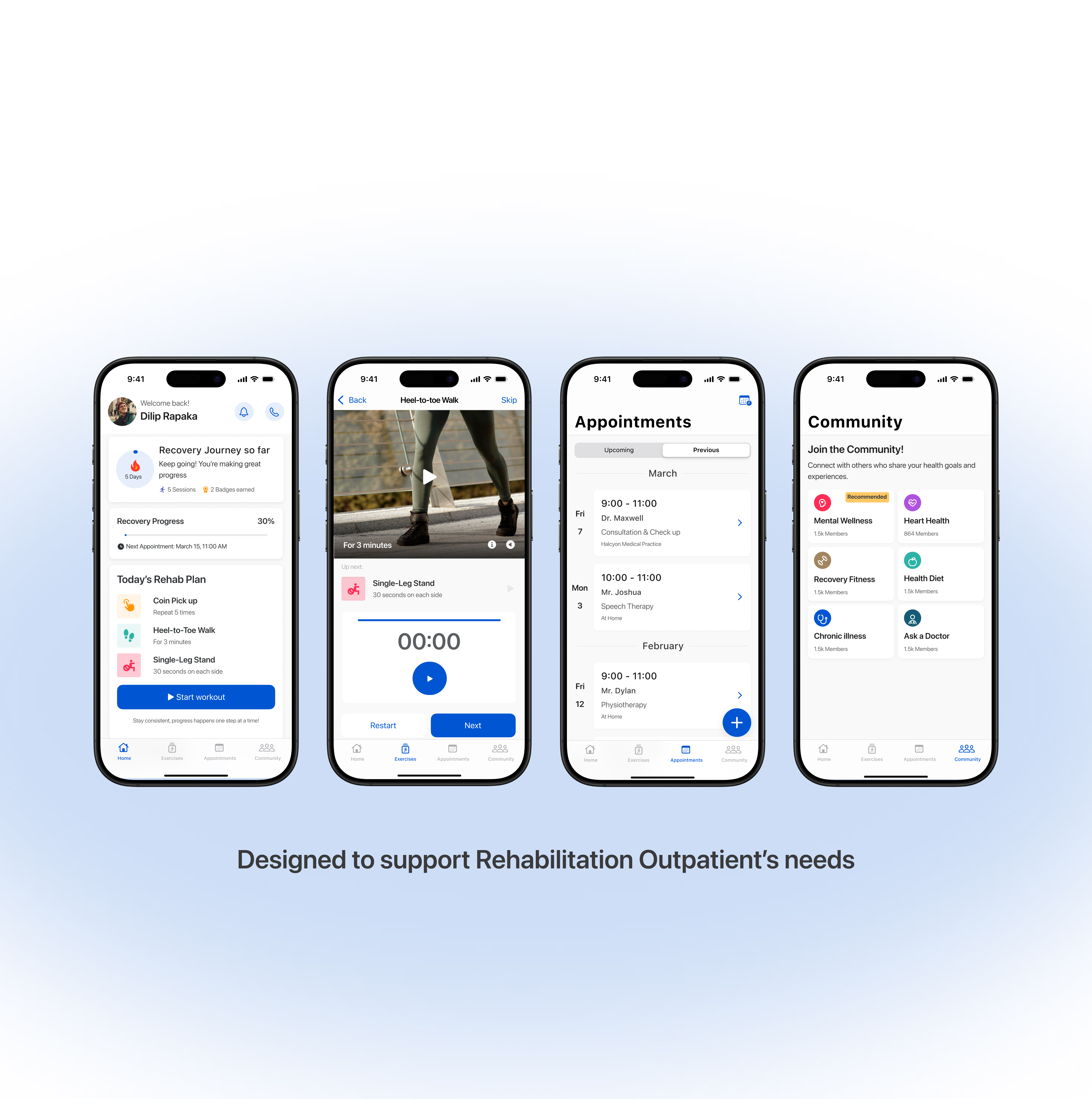
Prototype Walkthrough
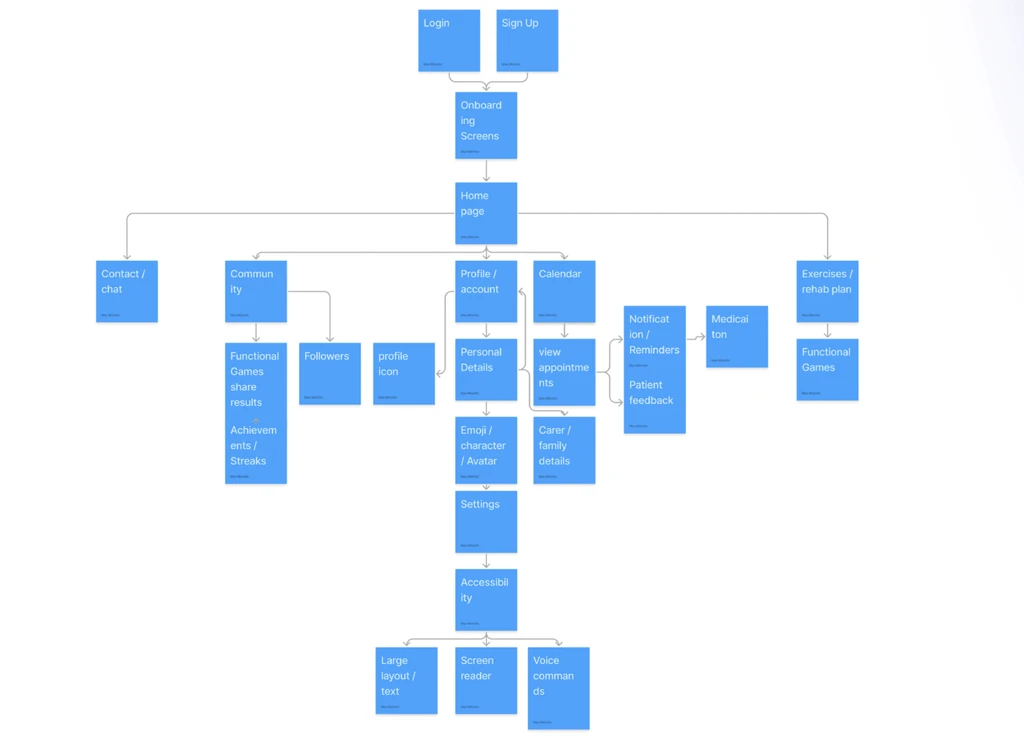
Information Architecture
Structuring content around patient needs
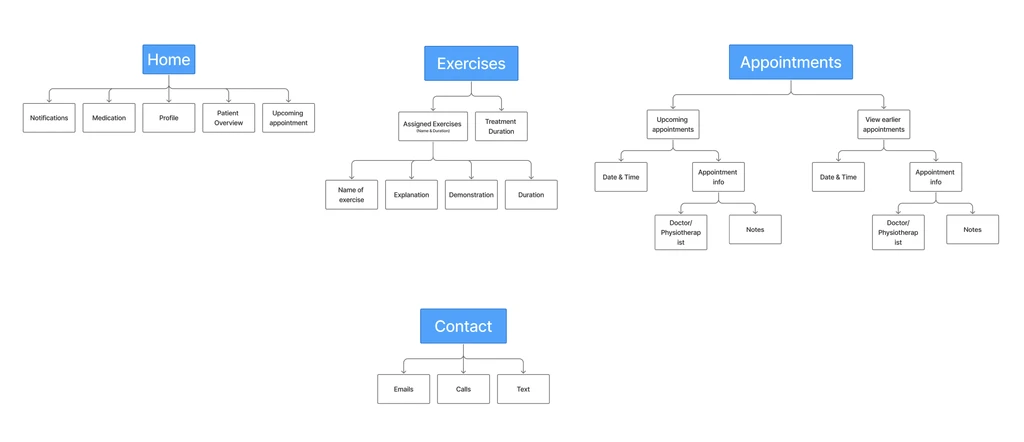
Before moving into visual design, we mapped out the full information architecture to ensure patients could reach core tasks within one or two taps.
Click to view
User Flows
Key journeys through the app
We mapped the primary user flows for the patients, identifying decision points, error states, and opportunities to reduce friction in common tasks such as logging an exercise or reviewing a patient's progress.
Click to view
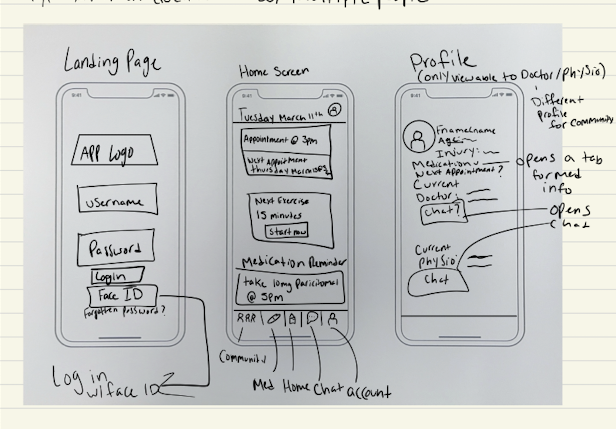
Sketches
Early ideation on paper
Initial sketches were used to rapidly explore layout options and interaction patterns before committing to digital wireframes. This low-fidelity stage helped the team align on structure and identify potential usability issues early.
Click to view
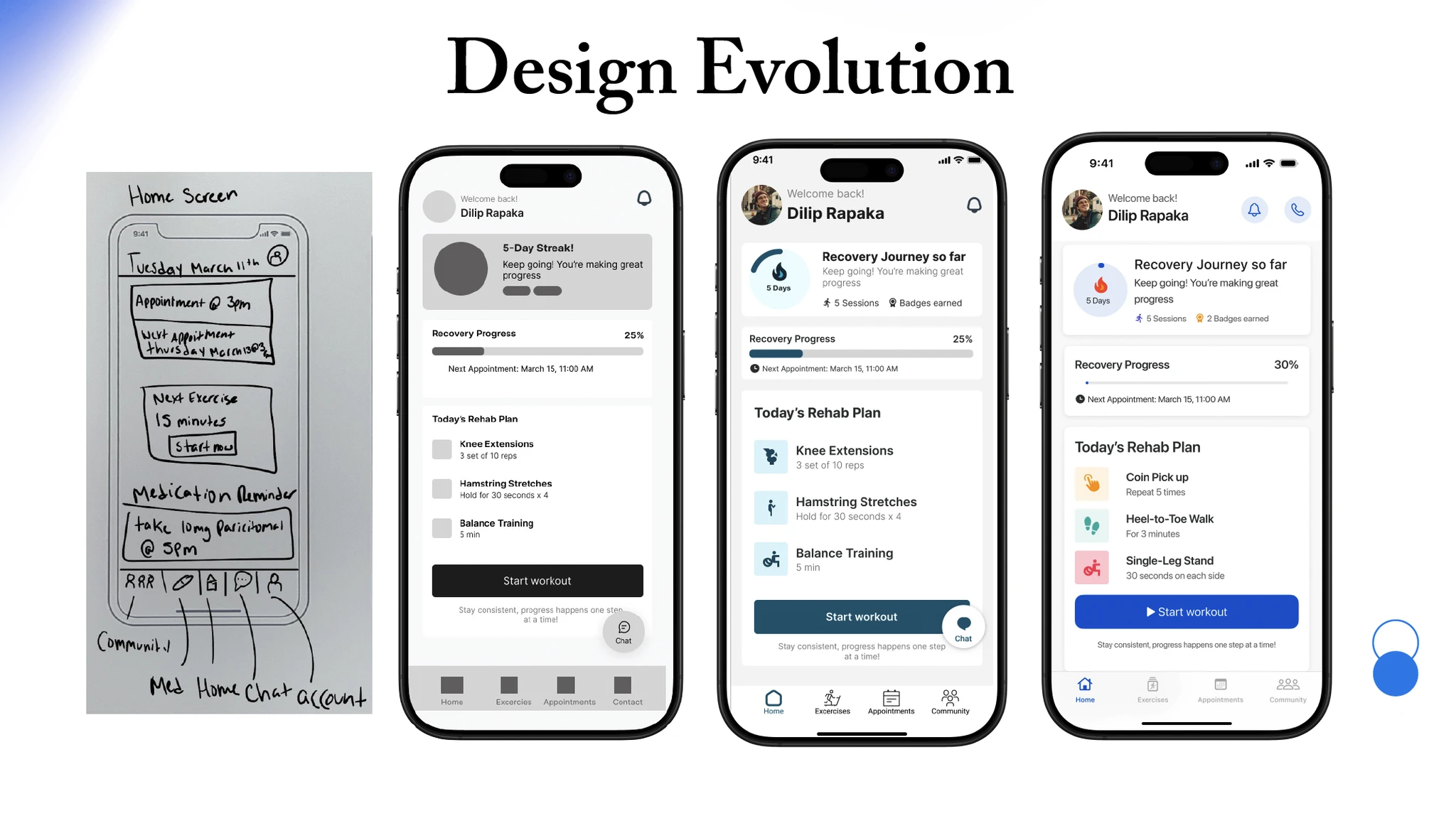
Design Evolution
From wireframes to high-fidelity
The design went through several iterations based on peer feedback and informal walkthroughs. Key changes included simplifying the home dashboard, improving the exercise logging flow, and introducing a progress visualisation that resonated with patients.
Click to view
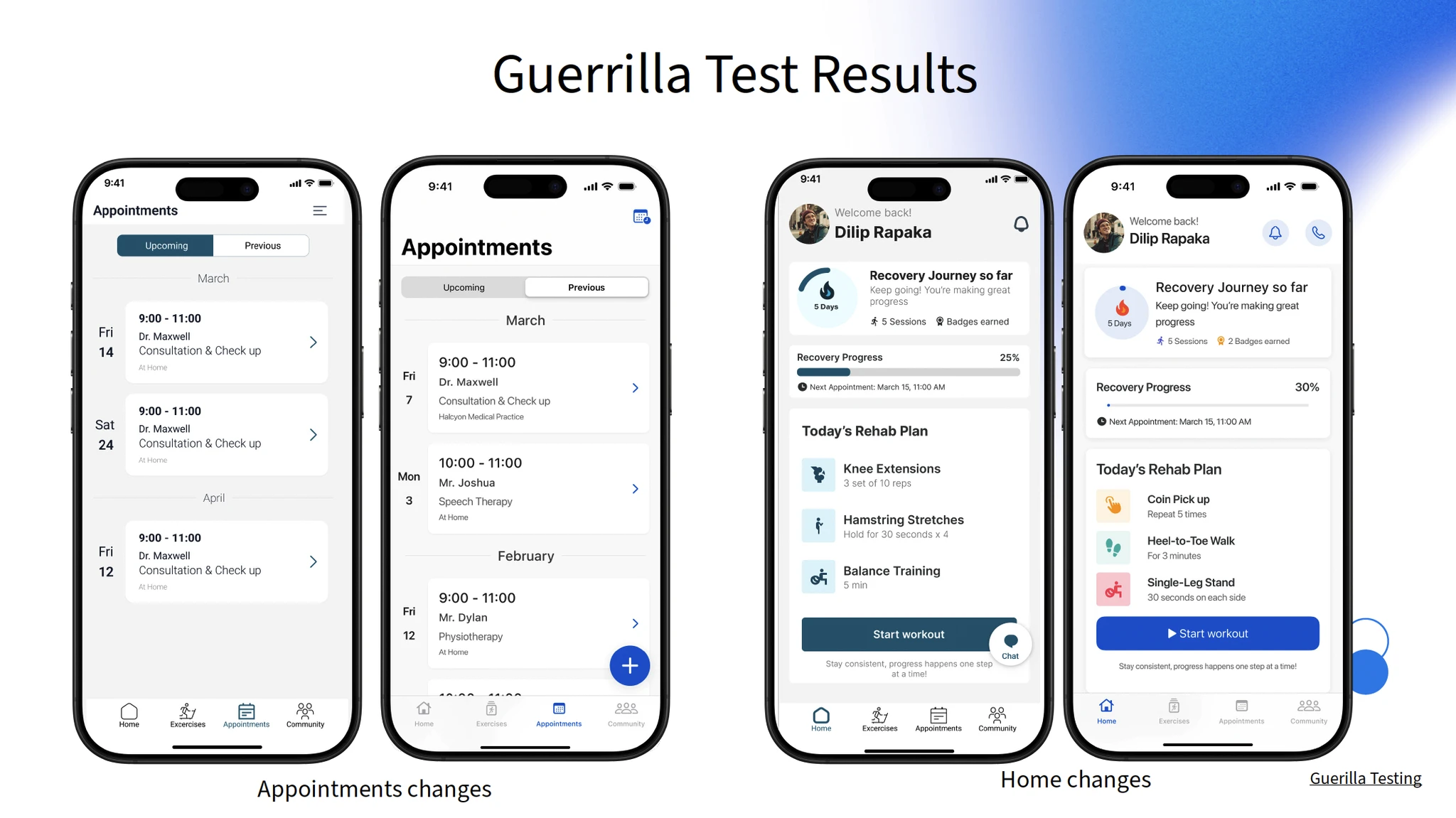
Guerrilla Testing
Quick feedback from real-world users
5 guerrilla testing sessions were conducted with participants approached in public settings. They were asked to complete short tasks on early prototypes, providing honest, unfiltered reactions. Key pain points identified:
- Unclear button labelling on the recommended community screen
- Unclear scrolling behaviour - the app did not appear scrollable
- The confirm details button on the appointment confirmation screen was too small
- The "+" label on the appointment screen was added to the bottom right of the screen
Click to view
Testing
Validating usability with real users
5 moderated usability testing sessions were conducted with participants representing the target patient demographic. Sessions followed a think-aloud protocol covering the core patient flows, with findings scored using the System Usability Scale (SUS). Changes made following testing:
- Increased appointment button size for easier interaction
- Added scrolling affordances to make navigation clearer
- Reduced information density on busier screens
- Added a congratulation message when joining a community
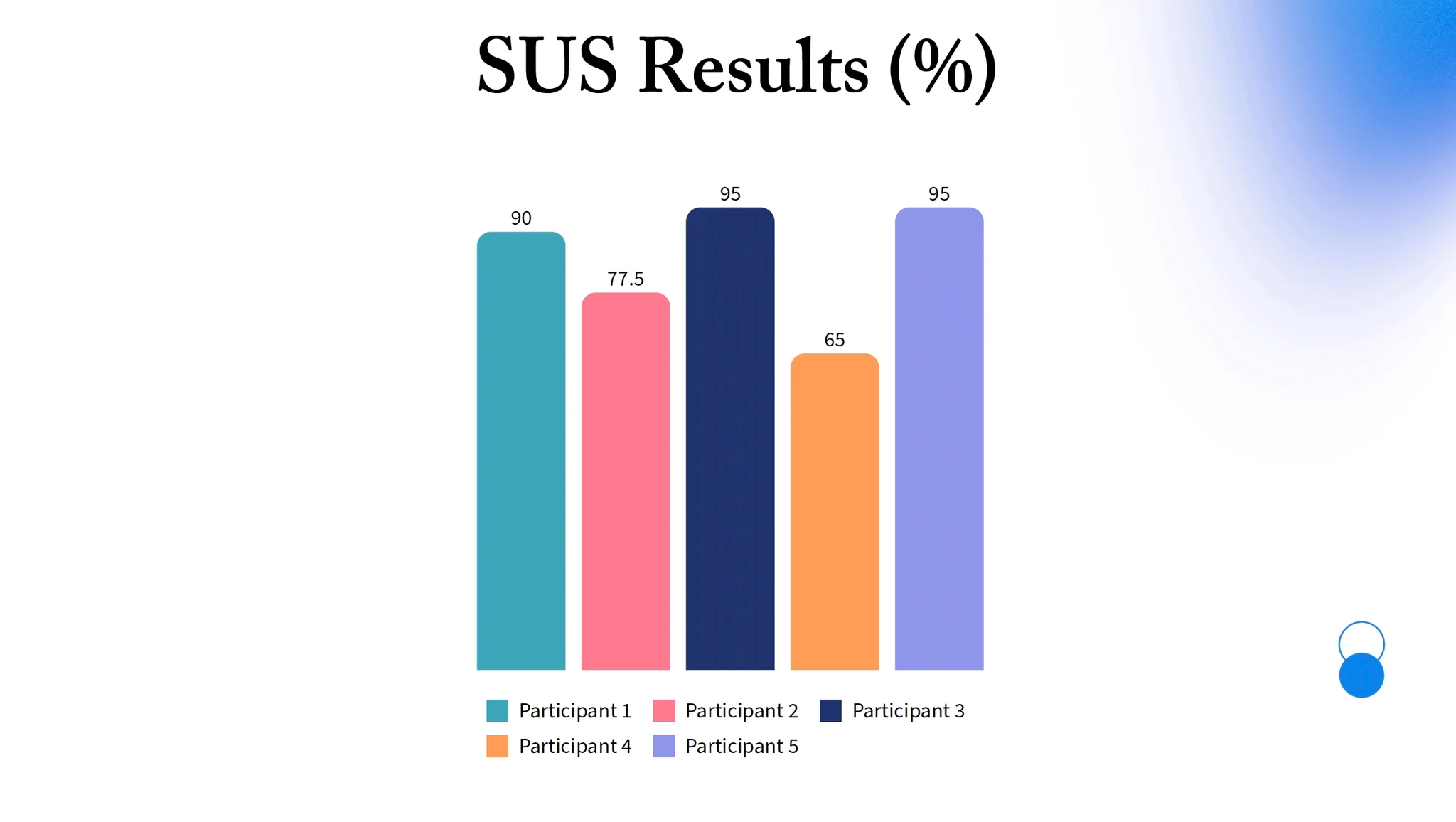
Click to view
Results
High usability and confident users
The final prototype focused on four core areas: daily exercises, appointments, community pages and progress tracking. Testing suggested that patients felt more confident about what to do at home, while clinicians responded positively to the idea of reviewing progress more clearly between visits.
NextStep demonstrated that patients valued simplicity and clarity above all, particularly the ability to see their plan at a glance and get exercise instructions without needing to contact their clinical team.
Design System
NextStep visual design system
The tokens and components defined for the NextStep app, covering colour, typography, spacing, radius, effects, and stroke.
Colour - Primary
Blue 50
#C3DCFF
Blue 100
#87B8FF
Blue 200
#4B95FF
Blue 300
#0F71FF
Blue 400
#0056D2
Blue 500
#0047AD
Blue 600
#003888
Blue 700
#002963
Colour - Semantic
Red
#FB3748
Yellow
#FFDB43
Green
#34C759
Purple
#5856D6
Teal
#00C7BE
Colour - Neutral
Background
#F8F6F3
Border
#E8E8E8
Disabled
#BBBBBB
Tertiary
#777777
Secondary
#333333
Primary
#1E2D3D
Typography
Let's get moving
Today's Exercises
Recovery Progress
Week 3 - Lower Body
Complete 3 sets of 10 reps with a rest between each
Last completed 2 days ago - 12 min
Home - Progress - Chat - Profile
Spacing
4
4px
8
8px
12
12px
16
16px
24
24px
32
32px
48
48px
64
64px
Radius
XS
4px
SM
8px
MD
12px
LG
16px
XL
24px
Full
100px (pill)
Effects
Surface
0 1px 4px rgba(0,0,0,0.08)
Elevated
0 4px 12px rgba(0,0,0,0.12)
Drop
0 8px 24px rgba(0,0,0,0.18)
Stroke
Hairline
0.5px
Default
1px
Medium
2px
Bold
3px
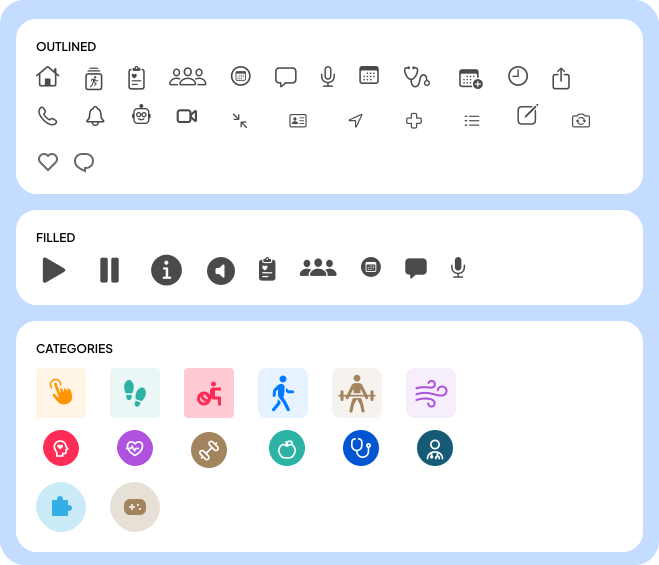
Icons